

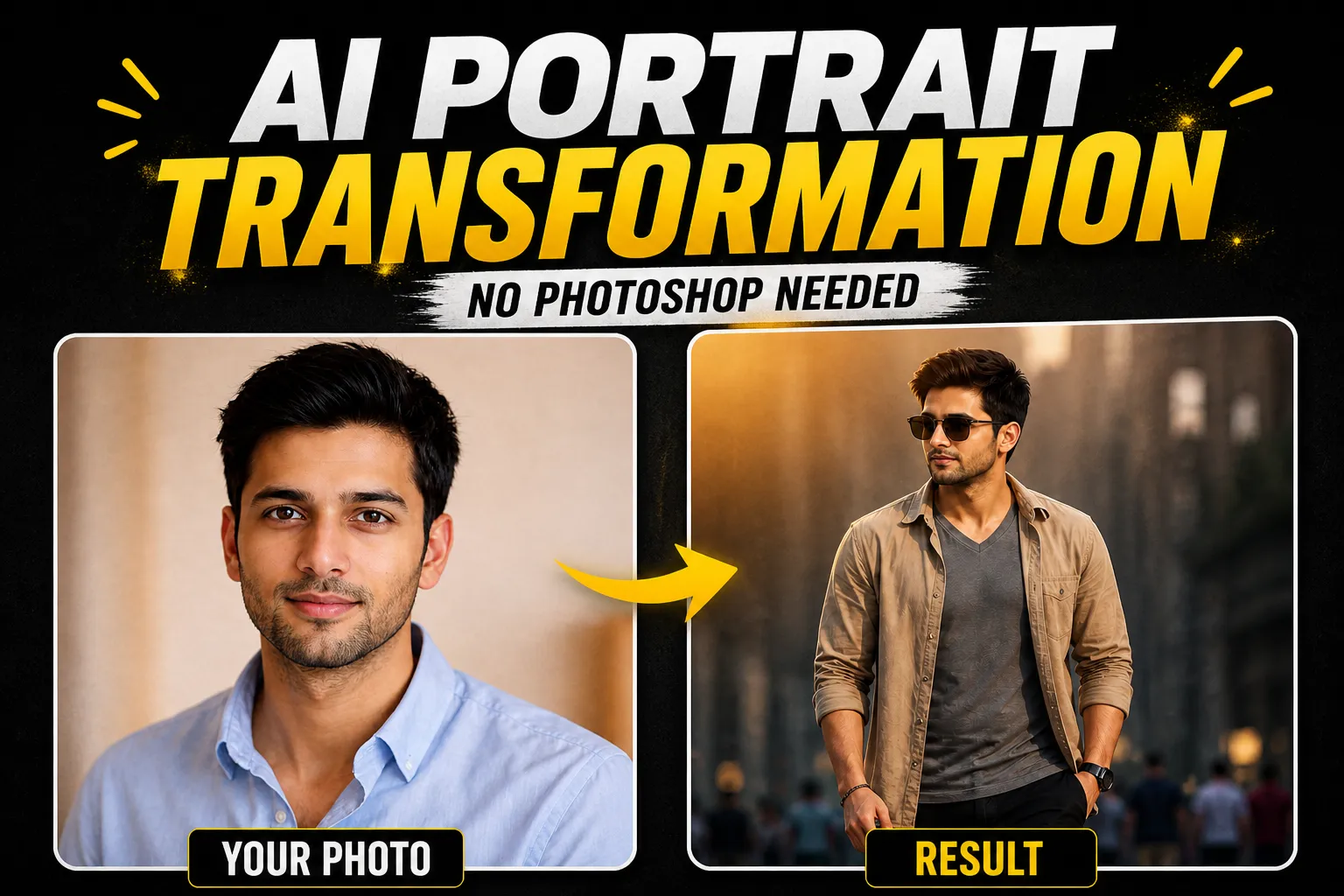
Artificial Intelligence is completely transforming the way we create visual content. What once required advanced skills in Photoshop, expensive software, and hours of editing can now be achieved in just a few seconds using AI tools.
One of the most trending styles today is the AI portrait transformation, especially the cinematic double exposure effect. This style combines a large artistic portrait with a full-body action shot, creating a powerful, professional, and editorial look.
In this guide, you’ll learn exactly how to create your own cinematic AI portrait transformation using a simple prompt. Whether you’re using ChatGPT, MidJourney, Leonardo AI, or Gemini, this method works across platforms.
🎯 What is AI Portrait Transformation?
AI portrait transformation is the process of turning a normal photo into a stylized, high-quality image using artificial intelligence.
Instead of manually editing images, AI tools analyze your uploaded photo and generate a completely new version based on your prompt.
This includes:
- Lighting adjustments
- Outfit changes
- Background transformation
- Cinematic effects
- Professional photography styling
The result? A studio-quality image without any editing skills.
🎬 What is a Double Exposure Cinematic Portrait?
A double exposure portrait blends two visuals into one image:
- A large, faded close-up portrait (background)
- A full-body shot (foreground)
This creates:
- Depth and storytelling
- A cinematic feel
- A premium, magazine-style look
This is exactly the style used in:
- Movie posters
- Fashion editorials
- Personal branding content
And now, you can create it using AI in seconds.
🚀 Why This Style is Trending in 2026
AI-generated cinematic portraits are exploding in popularity because they are:
🔥 1. Highly Shareable
People love visually striking content. These images stand out instantly on social media.
💼 2. Perfect for Personal Branding
Want to look more professional online? This style gives you a high-end identity.
⚡ 3. Fast & Easy
No Photoshop. No design skills. Just a prompt.
💰 4. Cost Effective
No need for photographers, studios, or editing software.
🛠️ Tools You Can Use
You can use this prompt on multiple AI platforms:
- ChatGPT (with image generation)
- MidJourney
- Leonardo AI
- Gemini AI
- DALL·E
All you need is:
✔ Your photo
✔ A good prompt
✍️ Best AI Prompt for Cinematic Portrait Transformation
Here is a copy-paste ready prompt you can use:
🔥 AI Image Generation Prompt
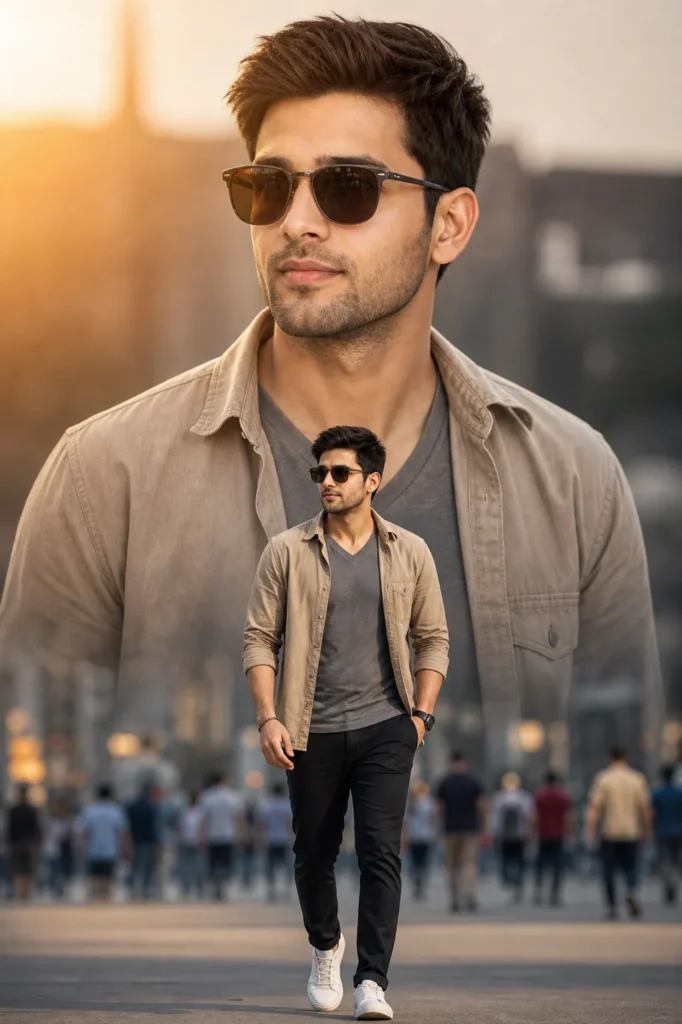
Use the uploaded face image as the subject’s face, keeping facial features 100% accurate, realistic, and naturally blended with the body. Maintain exact proportions, skin texture, and identity. Do not beautify or alter facial structure.

Create a cinematic double-exposure style portrait of a confident man walking forward in an urban street environment. The composition should include a large, softly faded close-up portrait of the same person in the background, looking slightly to the side with a calm and confident expression.

In the foreground, show a full-body shot of the same man walking toward the camera with a relaxed, confident posture. One leg stepping forward naturally, arms relaxed.

Outfit: fitted grey V-neck t-shirt layered with a light brown/beige casual overshirt, slim-fit black pants, and clean white sneakers. Add subtle accessories like sunglasses and a minimal bracelet or watch.

Background: a modern city street with soft blur (bokeh effect), people walking in the distance, slightly out of focus to create depth.

Lighting: warm golden hour sunlight from the side, creating soft highlights and cinematic shadows. Gentle glow on the face and clothing.

Style: ultra-realistic, high-end fashion photography, editorial magazine look, sharp focus, 4K resolution.

Composition: double exposure effect with smooth blending between the large portrait and the walking figure, depth of field, dramatic perspective.

Camera: 85mm lens, shallow depth of field, f/1.8, DSLR quality.

Color grading: warm tones with slight cinematic contrast, soft highlights, and natural skin tones.
📸 Step-by-Step Guide (Beginner Friendly)
✅ Step 1: Choose a Clear Photo
Use a high-quality portrait:
- Good lighting
- Face clearly visible
- Neutral background
✅ Step 2: Upload Your Image
Upload your image to your AI tool (ChatGPT, MidJourney, etc.)
✅ Step 3: Paste the Prompt
Copy the prompt above and paste it into the AI tool.
✅ Step 4: Generate Image
Click generate and wait a few seconds.
✅ Step 5: Refine (Optional)
You can improve results by adding:
- “more dramatic lighting”
- “ultra realistic skin texture”
- “cinematic depth”
🎨 Pro Tips for Better Results
Want to get next-level images? Follow these:
💡 Use High Resolution Photos
Blurry images = poor results.
💡 Add Accessories
Details like:
- Sunglasses
- Watches
- Jackets
Make your image look premium.
💡 Experiment with Lighting
Try:
- Golden hour
- Night city lights
- Neon cyberpunk
💡 Change Backgrounds
Instead of city:
- Beach
- Mountains
- Luxury interiors
💼 Use Cases for AI Portrait Transformation
This isn’t just for fun — you can actually use it professionally:
👨💻 LinkedIn Profile Photos
Look more confident and polished.
📱 Social Media Branding
Stand out on Instagram, TikTok, and YouTube.
🎥 YouTube Thumbnails
High CTR (click-through rate) visuals.
🧑💼 Personal Portfolio
Perfect for freelancers and entrepreneurs.
💡 Digital Marketing
Create eye-catching ads easily.
⚠️ Common Mistakes to Avoid
❌ Over-editing Prompts
Too many instructions can confuse AI.
❌ Low Quality Images
Always use sharp photos.
❌ Unrealistic Expectations
AI is powerful, but results improve with experimentation.
📈 SEO Benefits of Using AI Images
Using AI-generated images on your website can:
- Increase engagement
- Improve dwell time
- Boost social shares
- Enhance visual appeal
For WordPress users (like you), this is a huge advantage.
🧩 Final Thoughts
AI portrait transformation is one of the most powerful tools available today for content creators, freelancers, and marketers.
With just one prompt, you can turn a simple photo into a cinematic masterpiece that looks like it came from a professional photoshoot.
No Photoshop. No design skills. No expensive tools.
Just AI + Creativity.

